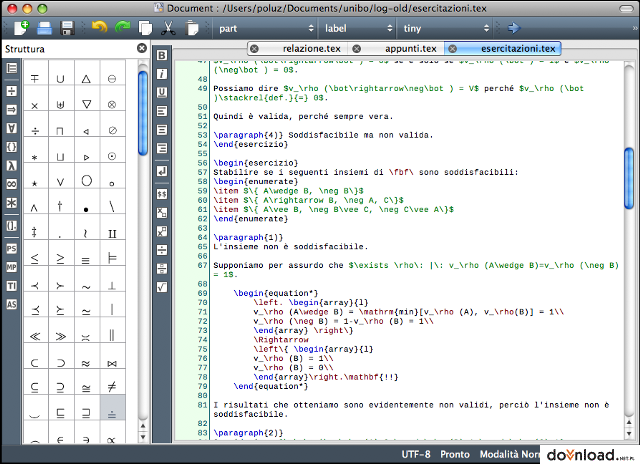
Description Texmaker 1.9.2:
Texmaker description
A text editor that integrates many tools needed to develop documents with LaTeX, in just one application.
Texmaker is a free, easy-to-use, highly-featured and powerfulLaTeX editor, that integrates many tools needed to develop documents with LaTeX.
Here are some key features of "Texmaker":
· an unicode editor to write your LaTeX source files (syntax highlighting, undo-redo, search-replace, spell checker...)
· the principal LaTex tags can be inserted directly with the "LaTeX" and "Math" menus
· 370 mathematical symbols can be inserted in just one click
· wizards to generate code ('Quick document', 'Quick letter', tabular, tabbing and array environments)
· LaTeX-related programs can be launched via the "Tools" menu
· the standard Bibtex entry types can be inserted in the ".bib" file with the "Bibliography" menu
· a "structure view" of the document for easier navigation of a document (by clicking on an item in the "Structure" frame, you can jump directly to the corresponding part of your document
· extensive LaTeX documentation
· in the "Messages / Log File" frame, you can see information about processes and the logfile after a LaTeX compilation
· the "Next Latex Error" and "Previous Latex Error" commands let you reach the LaTeX errors detected in the log file
· by clicking on the number of a line in the log file, the cursor jumps to the corresponding line in the editor
· an integrated LaTeX to html conversion tool
Texmaker is supported by Windows 2000, Windows 2003 32-bit, Windows 9x, Windows NT 4.0, Windows Vista 32-bit, Windows XP 32-bit.

texmakerwin32_install.exe ( 9.37MB )
443 downloads
3/6 (2 votes)
Changelog Texmaker 1.9.2:
· A "favorites symbols" panel has been added (just right-click on a symbol to add it to the favorites)
· Users can now restore a previous session (when closing the program, the names of the opened documents are automatically recorded)
· The bidirectional support has been removed (not enough stable)
· Words can again be selected by using SHIFT+LeftArrow and SHIFT+RightArrow
· On macosx, opening a file by double-clicking on it in the Finder will no more crash the program
· The trouble with dark color kde theme has been fixed
Copyright © 2001-2010 downloadsource.net All rights reserved