A-PDF Restrictions Remover Download
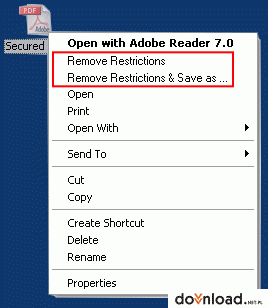
A-PDF Restrictions Remover is extremely easy to use. Just right click the PDF file in Windows Explorer, and in the context-sensitive menu that pops up, select either the "Remove Restrictions" or "Remove Restrictions & Save as..." option. In just a few seconds, you will have a PDF file with no restrictions. You can edit, print, copy, and more with your PDF files.


